> ## Documentation Index
> Fetch the complete documentation index at: https://docs.geckovision.tech/llms.txt
> Use this file to discover all available pages before exploring further.
# Access & auth
> The whole engine/adapter seam is one function — Session.auth_headers(). How Gecko handles auth and paywalls invisibly to the agent.
Auth is invisible to the agent. The agent describes intent; Gecko injects
credentials at call time.
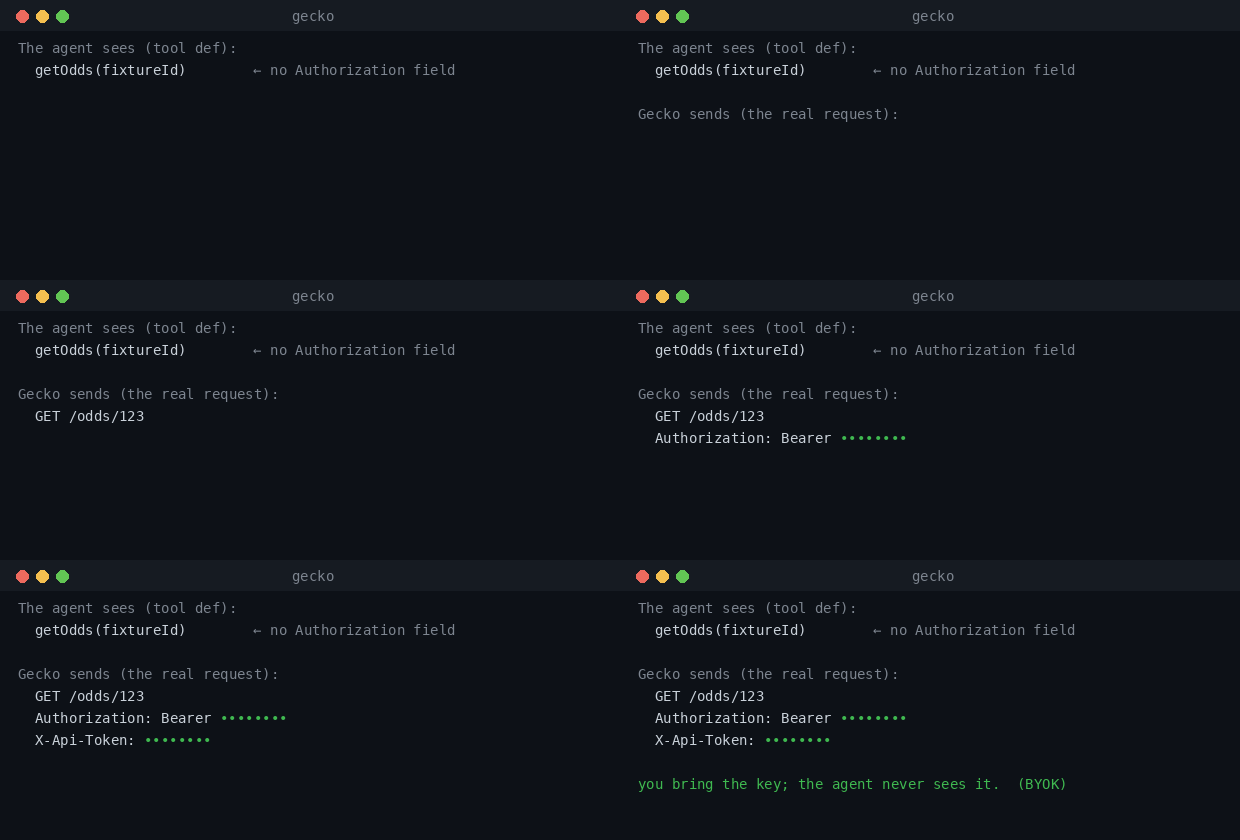 The entire engine/adapter seam is **one function**:
```python theme={null}
class AuthSession(Protocol):
def auth_headers(self) -> dict[str, str]: ...
```
Any object with `auth_headers() -> dict[str, str]` is a valid session. A paywalled API
returns its tokens; a public API returns an empty dict. This is the design that keeps
the engine **API-agnostic** — adding an API is data (the spec) plus, at most, this one
adapter.
## Sessions you get out of the box
A two-token authenticated session (JWT + API token). Returned by the access
handshake.
For public, no-auth APIs — `auth_headers()` returns an empty dict.
A non-live session for recorded demos: auth headers are present but not real.
## Store your keys safely — the credential resolver
You don't have to hand-write a `Session`. Gecko ships a credential resolver that keeps
provider secrets in your **OS keychain** and injects them at call time — the key never
enters the agent's context, shell history, a dotfile, or a log, and **it never leaves
your machine**.
```bash theme={null}
gecko auth set colosseum # hidden prompt — paste the key; it goes to your OS keychain
gecko auth list # names only, never values
gecko auth test colosseum # reports which backend answered — never the value
gecko auth rm colosseum # remove
```
The resolver tries, in order: your **OS keychain** → an external secret-manager command
(`op` / `vault` / `pass`) → an environment variable (CI/headless). For CI, just
`export COLOSSEUM_COPILOT_PAT=...`.
**Local vs hosted.** Because the key stays on *your* machine, an API that needs *your*
key runs **locally** (`gecko auth set …` then serve it). The hosted
`mcp.geckovision.tech` serves only the **public** surfaces — Gecko never holds a user's
key, so a keyed, per-person API can't be a shared hosted surface.
## How auth gating works
When a session returns an **empty** auth-header dict, Gecko treats it as "this
session can't satisfy auth-gated operations" and **hides those operations from the
agent** — it could only mis-call them. A session *with* auth surfaces everything,
unchanged. If an auth-gated tool is forced anyway, `prepare()` raises a typed error
rather than firing a request that can't succeed.
```python theme={null}
from gecko.access import public_session
from gecko.client import AgentApiClient
client = AgentApiClient(spec, session=public_session())
client.list_tools() # auth-gated operations are not in this list
client.prepare("some_auth_only_op", {}) # raises CallError — correctly refused
```
## The two-token handshake (worked example)
The live reference integration (the TxODDS World Cup API) uses a flow the agent never
has to learn. Gecko encodes it so the agent only ever describes intent:
```
guest JWT → on-chain subscribe (txSig) → sign(txSig:leagues:jwt) → activate → apiToken
```
producing a two-token session:
```
Authorization: Bearer (httpAuth)
X-Api-Token: (apiKeyAuth)
```
Transport and signer are **injected**, so the whole flow is unit-testable with no
network and no keys:
```python theme={null}
from gecko.access import establish_session
session = establish_session(base_url, tx_sig, leagues, signer=my_signer)
session.auth_headers()
# {"Authorization": "Bearer ...", "X-Api-Token": "..."}
```
## The on-chain step
The `subscribe` transaction itself is a wallet-signing, network-specific step that
lives outside the access layer (in `scripts/`). The access layer takes the resulting
`txSig` plus a signer and finishes the session.
**Mainnet boundary.** The subscribe transaction is **founder-run only**. The tooling
*simulates* by default (no spend) and hands over the exact command; a human broadcasts
it. Gecko does not sign or broadcast mainnet transactions on its own.
## Short-lived tokens & OAuth — auto-refresh
Most production APIs hand you a **short-lived access token plus a refresh token**
(the OAuth pattern). Gecko manages that lifecycle for you, behind the same
`auth_headers()` seam — the agent never sees an expiry:
* **Proactive refresh** — when the token is within a leeway window of expiry, the
session refreshes it *before* returning headers.
* **Reactive self-heal** — if a live call still comes back `401`, Gecko re-authenticates
and retries the identical call **once** (bounded — a second failure raises a typed,
redacted error, never an infinite loop).
You do the one-time interactive login yourself (Gecko can't complete a human's 2FA);
after that, Gecko takes over. `OAuth2Lifecycle` refreshes via a `refresh_token` grant,
and adapters like `oauth2_from_dpo2u()` read a local token file and refresh on their own.
```python theme={null}
from gecko.access import oauth2_from_dpo2u # reads ~/.dpo2u/oauth.json, refreshes at the token endpoint
session = oauth2_from_dpo2u()
session.auth_headers() # a valid Bearer token — refreshed transparently as it nears expiry
```
The refresh token (a secret) resolves through the credential resolver in your local
runner; the short-lived access token lives in memory only. Nothing about the token is
persisted by Gecko's control plane.
## What Gecko never does with credentials
* It never exposes auth headers in the agent-facing tool definitions.
* It never logs tokens or keys — secrets are redacted before any error is raised.
* Its **control plane** never stores or transmits your secret: the credential resolver
reads it from your local OS keychain (or env) and injects it at call time, on your
machine. Gecko only ever sends it toward the API's own host — never anywhere else.
See [Architecture](/architecture) for how this fits the control-plane model.
This documentation is built and hosted on [Mintlify](https://mintlify.com), a developer documentation platform.
The entire engine/adapter seam is **one function**:
```python theme={null}
class AuthSession(Protocol):
def auth_headers(self) -> dict[str, str]: ...
```
Any object with `auth_headers() -> dict[str, str]` is a valid session. A paywalled API
returns its tokens; a public API returns an empty dict. This is the design that keeps
the engine **API-agnostic** — adding an API is data (the spec) plus, at most, this one
adapter.
## Sessions you get out of the box
A two-token authenticated session (JWT + API token). Returned by the access
handshake.
For public, no-auth APIs — `auth_headers()` returns an empty dict.
A non-live session for recorded demos: auth headers are present but not real.
## Store your keys safely — the credential resolver
You don't have to hand-write a `Session`. Gecko ships a credential resolver that keeps
provider secrets in your **OS keychain** and injects them at call time — the key never
enters the agent's context, shell history, a dotfile, or a log, and **it never leaves
your machine**.
```bash theme={null}
gecko auth set colosseum # hidden prompt — paste the key; it goes to your OS keychain
gecko auth list # names only, never values
gecko auth test colosseum # reports which backend answered — never the value
gecko auth rm colosseum # remove
```
The resolver tries, in order: your **OS keychain** → an external secret-manager command
(`op` / `vault` / `pass`) → an environment variable (CI/headless). For CI, just
`export COLOSSEUM_COPILOT_PAT=...`.
**Local vs hosted.** Because the key stays on *your* machine, an API that needs *your*
key runs **locally** (`gecko auth set …` then serve it). The hosted
`mcp.geckovision.tech` serves only the **public** surfaces — Gecko never holds a user's
key, so a keyed, per-person API can't be a shared hosted surface.
## How auth gating works
When a session returns an **empty** auth-header dict, Gecko treats it as "this
session can't satisfy auth-gated operations" and **hides those operations from the
agent** — it could only mis-call them. A session *with* auth surfaces everything,
unchanged. If an auth-gated tool is forced anyway, `prepare()` raises a typed error
rather than firing a request that can't succeed.
```python theme={null}
from gecko.access import public_session
from gecko.client import AgentApiClient
client = AgentApiClient(spec, session=public_session())
client.list_tools() # auth-gated operations are not in this list
client.prepare("some_auth_only_op", {}) # raises CallError — correctly refused
```
## The two-token handshake (worked example)
The live reference integration (the TxODDS World Cup API) uses a flow the agent never
has to learn. Gecko encodes it so the agent only ever describes intent:
```
guest JWT → on-chain subscribe (txSig) → sign(txSig:leagues:jwt) → activate → apiToken
```
producing a two-token session:
```
Authorization: Bearer (httpAuth)
X-Api-Token: (apiKeyAuth)
```
Transport and signer are **injected**, so the whole flow is unit-testable with no
network and no keys:
```python theme={null}
from gecko.access import establish_session
session = establish_session(base_url, tx_sig, leagues, signer=my_signer)
session.auth_headers()
# {"Authorization": "Bearer ...", "X-Api-Token": "..."}
```
## The on-chain step
The `subscribe` transaction itself is a wallet-signing, network-specific step that
lives outside the access layer (in `scripts/`). The access layer takes the resulting
`txSig` plus a signer and finishes the session.
**Mainnet boundary.** The subscribe transaction is **founder-run only**. The tooling
*simulates* by default (no spend) and hands over the exact command; a human broadcasts
it. Gecko does not sign or broadcast mainnet transactions on its own.
## Short-lived tokens & OAuth — auto-refresh
Most production APIs hand you a **short-lived access token plus a refresh token**
(the OAuth pattern). Gecko manages that lifecycle for you, behind the same
`auth_headers()` seam — the agent never sees an expiry:
* **Proactive refresh** — when the token is within a leeway window of expiry, the
session refreshes it *before* returning headers.
* **Reactive self-heal** — if a live call still comes back `401`, Gecko re-authenticates
and retries the identical call **once** (bounded — a second failure raises a typed,
redacted error, never an infinite loop).
You do the one-time interactive login yourself (Gecko can't complete a human's 2FA);
after that, Gecko takes over. `OAuth2Lifecycle` refreshes via a `refresh_token` grant,
and adapters like `oauth2_from_dpo2u()` read a local token file and refresh on their own.
```python theme={null}
from gecko.access import oauth2_from_dpo2u # reads ~/.dpo2u/oauth.json, refreshes at the token endpoint
session = oauth2_from_dpo2u()
session.auth_headers() # a valid Bearer token — refreshed transparently as it nears expiry
```
The refresh token (a secret) resolves through the credential resolver in your local
runner; the short-lived access token lives in memory only. Nothing about the token is
persisted by Gecko's control plane.
## What Gecko never does with credentials
* It never exposes auth headers in the agent-facing tool definitions.
* It never logs tokens or keys — secrets are redacted before any error is raised.
* Its **control plane** never stores or transmits your secret: the credential resolver
reads it from your local OS keychain (or env) and injects it at call time, on your
machine. Gecko only ever sends it toward the API's own host — never anywhere else.
See [Architecture](/architecture) for how this fits the control-plane model.
This documentation is built and hosted on [Mintlify](https://mintlify.com), a developer documentation platform.